Technology
OpenIMS architecture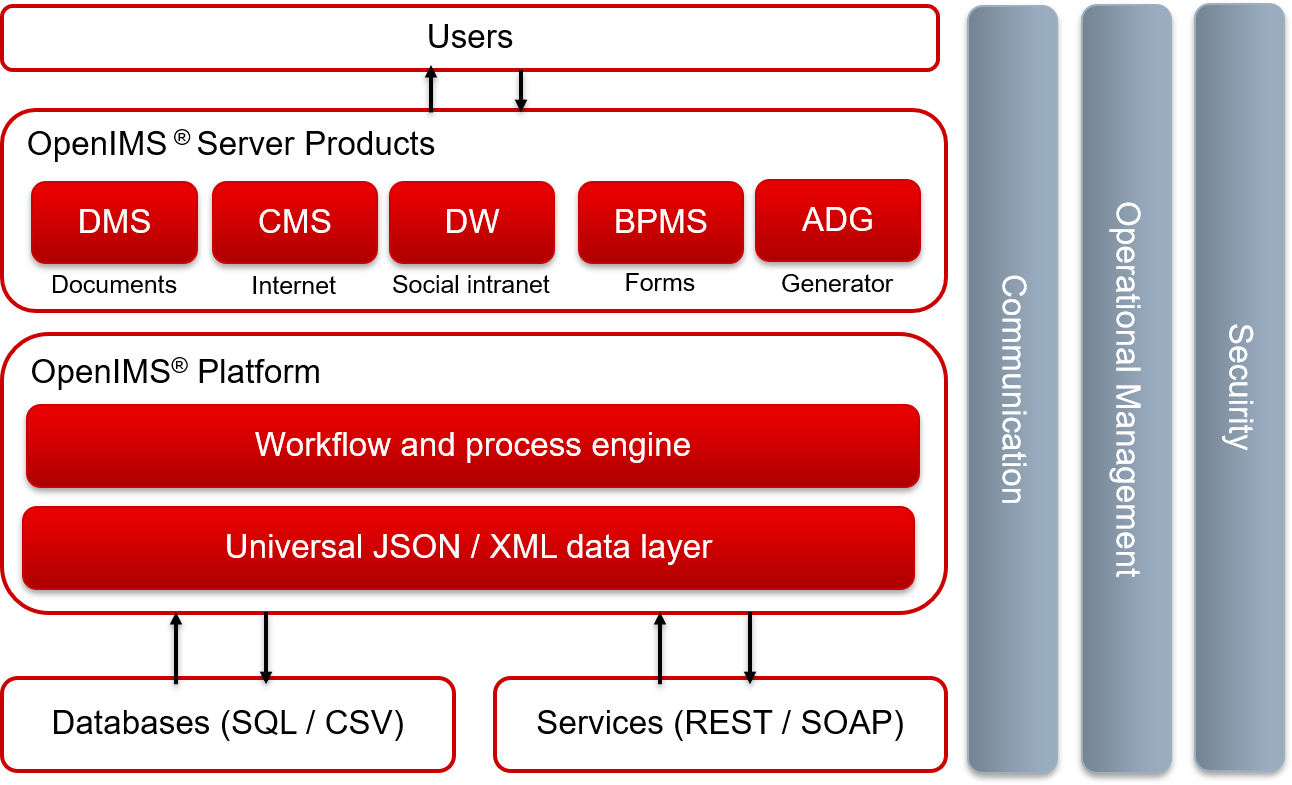
Operating systems
OpenIMS runs under Apache Webserver which runs under Windows, Linux (Redhat, CentOS, Suse), Apple, IBM AIX, HP/UX and Sun Solaris.
Database platforms
Because OpenIMS uses an integrated XML data store to store all information a database server is not required. Use of a database is optional. All common database servers are supported by OpenIMS. OpenIMS works with sophisticated XML objects. These can be stored in Oracle, Microsoft SQL-Server, MySQL, Sybase and ODBC compliant databases.
Integration
OpenIMS integrates, among other things, with SOAP, REST, CMIS, Webservices, COM, Java, XML, XSLT, ASP, PHP and Perl. For the Apache platform many standard components are available.
Client platforms
OpenIMS is 100% web browser based and can be used with modern Internet browsers such as Internet Explorer, Chrome, Firefox and Safari.
Hardware requirements
OpenIMS DMS is based upon Apache and requires the following minimum Linux server configuration: 4 GB RAM, a modern CPU and sufficient storage (preferably RAID and/or SSD). We assume that backup equipment is already available.
Hosting
OpenIMS is 100% web based so it can be hosted on any server and be made accessible from any PC with a web browser (LAN, WAN or regular Internet). Access is secured with a login id and password, which can be connected to a LDAP compliant directory service. Also unified login (SSO) and two factor authentication is available. For security we recommend SSL and/or VPN.